DeployOS Helps Solo Entrepreneurs Deploy & Manage Multiple Apps On Any VPS
No Need For A DevOps Engineer or Twiddling With The Command Line
A real deploy: source → build → HTTPS → health-checked live URL. You click one button; this is what runs.
Everything a platform team does, on hardware you own.
Every screen below is a real feature, not a mockup — screenshots straight from the shipping app.
Deploy 236 self-hosted apps instantly.
Stop figuring out how to install every tool from scratch. Launch WordPress, n8n, Grafana, Ollama and 230+ other apps in one click — or deploy an entire preconfigured stack for analytics, automation, newsletters and more.
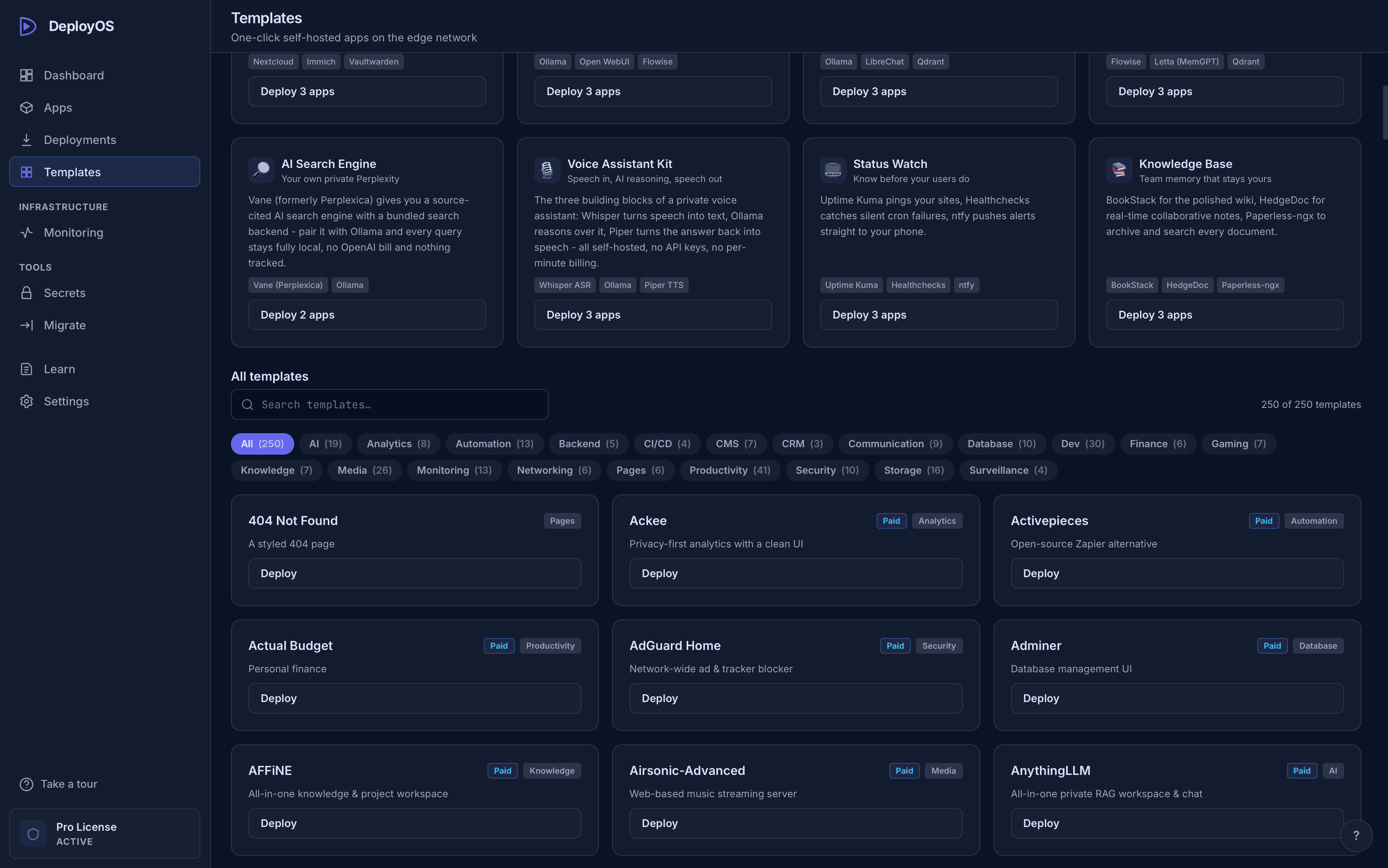
Auth, database and storage - without the Supabase bill.
Deploy the real self-hosted Supabase stack - Postgres, Auth, REST API, Realtime, Storage and Studio, wired up behind a Kong gateway - on your own $5 VPS in one click. The same anon and service-role keys your app already expects, generated automatically. No monthly hosting fee, no separate account.
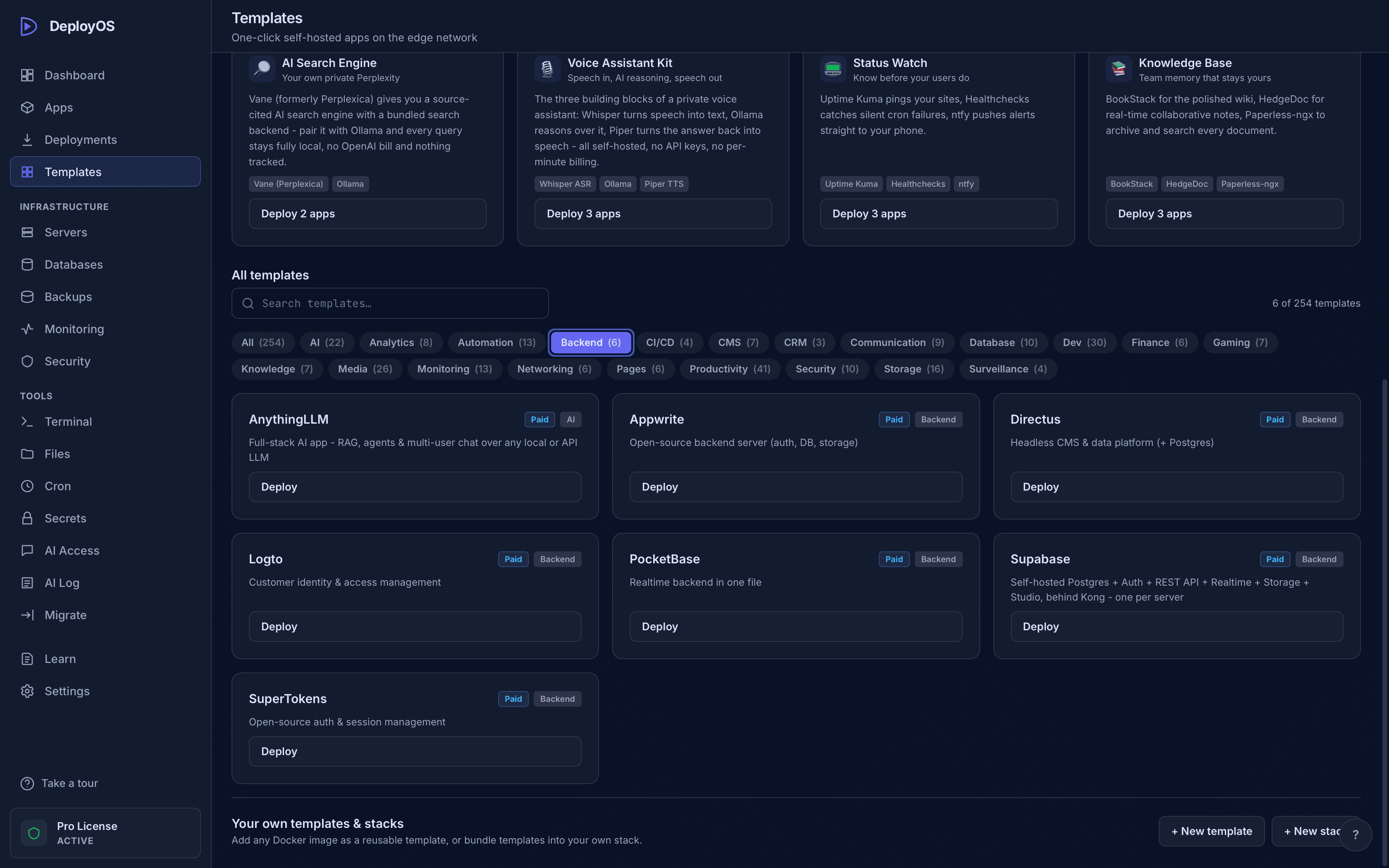
Never guess why it's broken again.
When something breaks, run a 9-step diagnostic over SSH - DNS, ports, proxy, container, network, route, health, TLS, logs - and get plain-English answers, not Stack Overflow spirals.
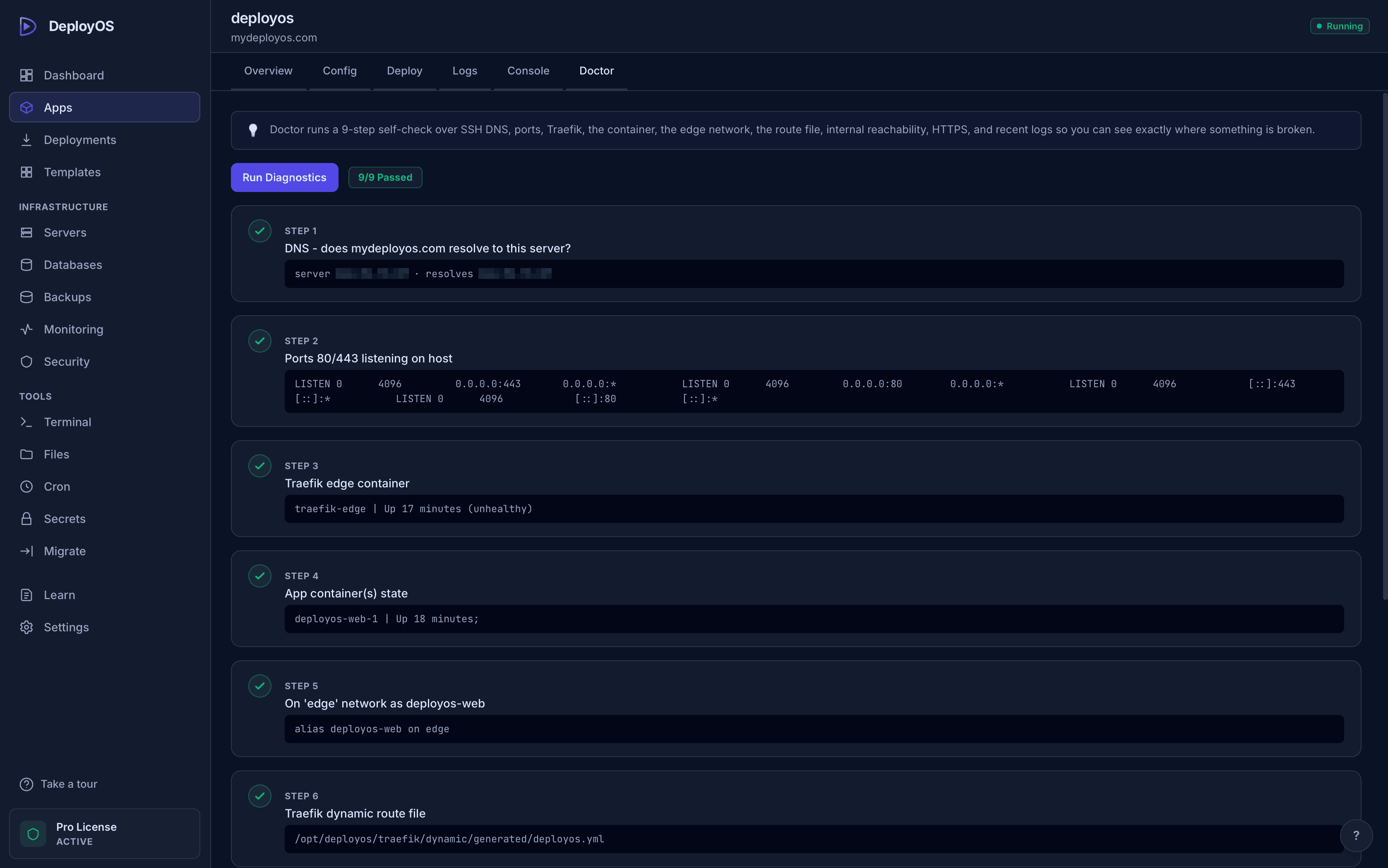
Production databases in one click.
Don't let database setup become another technical project. Deploy Postgres, MySQL, MongoDB, Redis and MSSQL in minutes, then browse, query and edit your data without wrestling with the command line.
Manage DeployOS with the same AI you're already building with.
DeployOS gives your AI a secure connection to your servers, so you can ask it to deploy an app, inspect what's broken, read the logs, run diagnostics, check your database or roll back a bad release — all from the same conversation. Works with Claude, Windsurf, Codex, Cursor, Antigravity, and more.
See what your AI can do on your VPS→Here's how DeployOS works.
Connect your server
Paste an IP and SSH key. DeployOS bootstraps Docker, a firewall, HTTPS routing and backups in one pass.
Pick a repo or template
Connect GitHub and choose your repo from a dropdown, or launch one of 236 open-source apps in a single click.
Deploy your app
Every push goes live with a health-checked rollout and a real HTTPS URL. One click rolls back to any previous build.
The full toolbox
Everything you'd pay a DevOps engineer for.
Every one of these ships in the app today — nothing here is on a roadmap.
Auto-Deploy on Push
Stop manually redeploying every time you update your app. Push your latest code and DeployOS automatically takes it live, health-checked before it counts.
One-Click Rollback
A bad update shouldn't cost you hours of debugging. Instantly roll back to your last working build and get your app back online, no rebuilding, no calling a developer.
Automatic SSL
DeployOS handles SSL installation automatically and verifies your domain and certificate are actually working before it calls the app live.
Free Auto-Backup
Never pay for server backup. DeployOS automatically backs up your databases, and lets you restore with one click when something goes wrong.
Realtime Monitoring
Know when something is wrong before your users start complaining. See CPU, RAM, disk usage, container health and request latency across your servers, all from one place.
Structured Logs
DeployOS surfaces your realtime server logs so you can quickly pinpoint errors instantly and fix issues fast.
File Manager
You no longer need SSH to manage your files. Browse your server, edit configs, upload files and download anything you need directly from DeployOS.
Advanced Server Security
Protect your server from hackers and bad actors. DeployOS handles firewall rules, brute-force protection and SSH hardening for you, with safeguards designed to prevent unauthorized access.
One-Click Server Migration
Don't get stuck with a server provider you no longer want. Move your apps to another VPS in one click, full transfer with volumes, databases and images.
What people actually say after using it.
“It took me less than 60 seconds to deploy my vibe-coded app with DeployOS — no Dockerfile, no server config, just a live, health-checked HTTPS URL. That app has since generated over $7,000+ in revenue.”

“I've deployed 9 apps on DeployOS without ever buying an SSL certificate — HTTPS just happens. What I love most is the MCP: it interprets deployment errors for my AI assistant instead of leaving me to dig through logs myself. And scaling? One click, done.”

Works for any server, from any vendor.
DeployOS talks to your server over plain SSH — if you can SSH into it, DeployOS can run it. Switch vendors any time; nothing about your setup is tied to us.
Manage your server with zero extra load.
No need to install anything on your server. DeployOS is a desktop app that works on both Mac and Windows, giving you advanced control without putting pressure on your server resources.
Self-hosted PaaS tools like Coolify and Dokploy are free and genuinely good, and they're a fair choice — but they need an always-on dashboard running on your server to work, which means a management service with root-level Docker access, reachable from the internet. DeployOS needs nothing running there. Your server hosts your apps and a reverse proxy, nothing else — so there is no third-party service holding the keys to your infrastructure, and no exposed port for one to attack.
Get started today.
Get DeployOS today for a one-time price — no monthly subscription. One native app on Mac or Windows and one $5 VPS anywhere in the world. Deploy 236 apps from templates, browse your databases inline, and let App Doctor catch failures before your users do.
14-day money-back guarantee
Use DeployOS for 14 days, risk-free. If it doesn't do anything stated on this page, just reach out and we'll refund your money — no questions asked.
Everyone else rents you software.
Buy this one once.
DeployOS turns any $5 VPS into your own VPS Manager — push from GitHub, automatic HTTPS, databases, backups, 236 one-click apps, no per-site cap. Runs on macOS and Windows, connects to any server over SSH with zero agents installed. What costs $19–39/month on managed platforms or per-site on shared hosting costs you a single payment. You pay once and own it forever — no subscription, a year of updates included, license emailed instantly.
Prove it works on your own VPS.
- 1 VPS - yours forever, no card
- 5 starter templates
- Deploy from GitHub
- HTTPS included
- Community support
For developers and indie builders running their own apps.
- 1 device license
- Unlimited servers & deployments
- All 236 templates & Stacks
- Databases, backups & cron
- 1 year of updates
- Email support
14-day money-back guarantee — no questions asked
For agencies & businesses replacing shared hosting.
- Everything in Solo
- 3 device licenses
- Move apps between servers in one click
- Priority support
- Founder's Edition: lifetime updates (first 500)
14-day money-back guarantee — no questions asked
14-day money-back guarantee, no questions asked. One license covers macOS and Windows. Licenses keep working after the 12-month update window ends — renew at 50% to keep receiving new versions.
| Compare plans | Free | Solo | Pro |
|---|---|---|---|
| Price (one-time) | $0 | $79 | $149 |
| Servers | 1 | Unlimited | Unlimited |
| Templates | 5 starter | All 236 | All 236 |
| Stacks (curated combos) | ✓ | ✓ | |
| Move apps between servers | ✓ | ||
| Device licenses | 1 | 1 | 3 |
| Updates included | 1 year | 1 year | |
| Support | Community | Priority |
Everything people ask before buying.
Do I need to know Docker or Linux?
No. You paste your server's IP address and SSH key once - DeployOS installs Docker, configures the firewall and HTTPS routing, and from then on you deploy from a visual app. There's a Simple mode that hides the infrastructure entirely, and an Advanced mode with every dial when you want it.
How is this different from shared hosting (cPanel, GoDaddy, Bluehost)?
Shared hosting rents you a slice of someone else's server and caps what you can run - usually one site, PHP only, hard CPU and RAM limits. A VPS is a full server that's entirely yours, but managing one yourself usually means learning Docker, Nginx and Linux first. DeployOS is that missing piece: it turns a bare $5 VPS into something as easy to run as a hosting panel, except there's no per-site cap - host as many apps, databases and background jobs as the hardware can hold, for one price instead of one bill per site.
Why not just use Ansible, Terraform or NixOS instead?
If you're already comfortable maintaining playbooks or Nix configs across a fleet of servers, those tools are genuinely great and DeployOS isn't trying to replace them - they're built for infrastructure-as-code at scale. DeployOS is for the much more common case: deploying a handful of apps without writing or maintaining a playbook for each one. It's push-button where Ansible is code-first - less powerful for managing a large fleet, much faster for a side project, a client site, or a small business's handful of apps.
Why pay anything when Coolify, Dokploy or CapRover are free?
Because they're genuinely good and you should seriously consider one. Coolify is free and open source, and its community is bigger than ours by a lot - more contributors, more Discord, more answers when something breaks at 2am. If free-and-open-source is the deciding factor for you, use it; we mean that without qualification. The difference is architectural, and it comes down to one question: what runs on your server permanently? Those tools answer 'a web dashboard with root-level Docker access, listening on a port.' DeployOS answers 'nothing.' No agent, no daemon, no dashboard, no listening port - the control plane is the desktop app on your own machine, and it connects over SSH on demand. That's why the security tradeoff they ask you to accept is one DeployOS doesn't ask you to accept: there is nothing on your server between deploys for a vulnerability to live in, and nothing reachable from the internet holding your infrastructure credentials. That isn't a claim DeployOS makes about itself being safer than mature open source - it's a smaller amount of machinery, which is easy to reason about and easy to verify. It's also a real tradeoff running the other way: those tools get real inbound webhooks from GitHub because they have an always-on process to receive one. DeployOS polls, so auto-deploy has extra latency and only runs while the app is open. And being smaller is a genuine cost: DeployOS is one founder, not a community. If a large maintainer pool matters to you for critical infrastructure, that's a legitimate reason to pick the free option. See /vs/coolify for the full honest comparison.
Isn't it reckless to let an AI agent manage production infrastructure?
It's a real concern, and we'd rather you ask it than assume we handled it. That's exactly why the free plan ships a read-only MCP server, and why every paid plan gates the dangerous tools behind settings that are off by default. Every write action - deploy, restart, scale, teardown, database writes, cron - is its own toggle. Teardown, scaling to zero, restarting a critical-tagged app, and removing a cron job all require a human confirmation dialog before they execute, with a two-minute timeout that defaults to 'no.' Every write call is logged locally - tool, target, arguments, result, duration - filterable and exportable, and never transmitted anywhere. The 15 read-only tools never return secret values. One global switch pauses all AI access instantly, regardless of individual settings. DeployOS also writes a .claudeignore into your repo on every deploy so secret files never enter an AI's context. We think that's the right standard for anything touching production. If you disagree, the safe default is to leave it paused and deploy from the GUI, which is a fully supported way to use the product.
I don't have a server. Where do I get one?
Any VPS provider works: Hetzner (from ~€4/mo), DigitalOcean, Vultr, Contabo, Linode, OVH, AWS, Hostinger - if you can SSH into it, DeployOS can run it. Create the cheapest Ubuntu server they offer, paste its IP into DeployOS, and it handles the rest.
Is it really pay-once? What's the catch?
Really. Your license works forever, and includes a year of app updates. After that year the app keeps working exactly as it is - you only renew (at 50% off) if you want to keep receiving new versions. There is no subscription and nothing hosted by us to pay for.
What happens when a deploy breaks?
DeployOS is built for exactly that moment: it detects the app isn't answering, hunts for the right port automatically, surfaces the app's own crash logs in the deploy output, and the Doctor pinpoints DNS/proxy/network issues in one click. The last three builds stay cached on your server for instant rollback.
Where do my secrets and SSH keys live?
In your operating system's keychain, on your machine. DeployOS has no backend - your credentials are never uploaded anywhere, because there is nowhere to upload them to. The app talks straight to your server over SSH.
How do I know the free alternatives aren't the smarter bet here?
In a lot of cases they are. Self-hosted PaaS tools like Coolify are free, open source, and maintained by a community - that is a real, structural advantage over a product maintained by one person, and anyone claiming otherwise is selling you something. What DeployOS offers is a different bet on how much should run on the server itself: the free tools need an always-on dashboard to work, DeployOS needs nothing. Fewer moving parts to patch, no exposed management port, no third-party service holding root-level access to your infrastructure, and your credentials never leave your machine. You also get a licensed product with a 14-day money-back guarantee and someone accountable when it breaks, instead of a project whose maintainers can change direction. Free and community-backed is the better choice if you want the code and the maintainers. DeployOS is the better choice if you want the smallest possible footprint on the server and a clear security boundary between your apps and the thing managing them. Both are legitimate. Read /vs/coolify before deciding - it's written by us and spends most of its length on where the alternatives win.
Will it interfere with things already running on my server?
No. DeployOS scans what's already there and adopts it non-destructively - existing containers keep running and get imported into the dashboard. If another proxy already owns port 443, DeployOS steps back and tells you instead of clobbering it.
Which platforms does the desktop app run on?
macOS (Apple Silicon and Intel, one universal build) and Windows 10/11 (64-bit) - both downloadable today, and one license covers either. Linux is next on the roadmap; join the newsletter below to hear the moment it ships.
Windows warned me about an "unknown publisher" - is the download safe?
Yes - that warning appears because our Windows installer isn't yet signed by a public certificate authority (the macOS build is fully notarized by Apple; the Windows CA certificate is in progress). The installer is built from the same code, served only over HTTPS from this site, and we publish its SHA-256 checksum on the download page so you can verify the file yourself. Click "More info → Run anyway" to proceed.
What if it's not for me?
Every paid plan has a 14-day money-back guarantee, no questions asked. And the Free plan is a real license - one server, real deploys - so you can prove it works on your VPS before paying anything.
Something else on your mind? Email us — a human answers.